
Connecting Postscript
Integrate your Postscript revenue data into Hiro to see SMS-attributed revenue alongside your other channels. The setup depends on your Postscript plan.
Enterprise Postscript Plans
Enterprise brands can request a Data Warehouse Push, giving Hiro an automated data feed. To set this up, email help@hiroanalytics.com and we'll coordinate the backend configuration.
Non-Enterprise Postscript Plans
Non-Enterprise brands connect Postscript via manual revenue report upload. The steps below walk through the setup.
Things to know before you start:
Revenue Data Only: This integration only brings in revenue data from Postscript, not engagement metrics (e.g., clicks, recipients, conversions).
Manual CSV Upload: Postscript provides a rolling 90-day revenue report, so you’ll need to download and upload a CSV each time you want to update the data.
Attribution Model: You can choose to include or exclude view-only attributions (orders attributed to someone who saw an SMS but didn’t click).
Step 1: Download Your Revenue Report from Postscript
In Postscript, go to Reports → Revenue Report → Last 90 Days
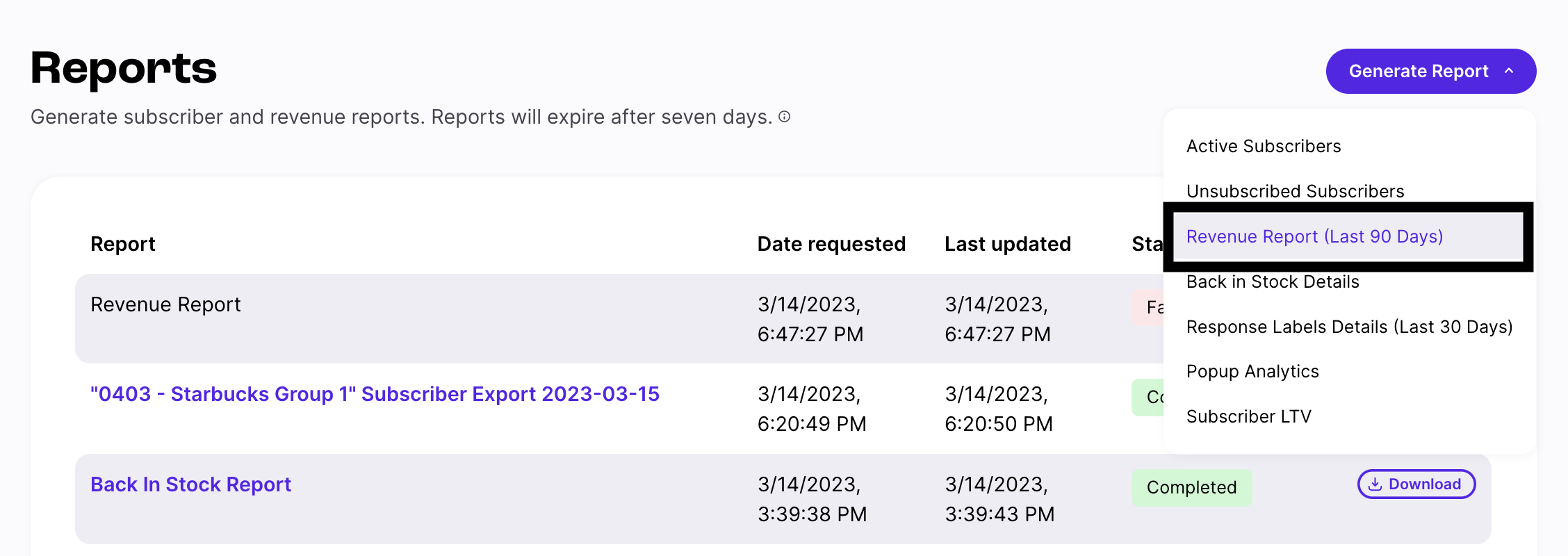
Download the CSV
Step 2: Upload the CSV in Hiro
In Hiro, go to Account → Client Settings → Connect Postscript SMS.
Upload the CSV file you just downloaded.
(Optional) Exclude View-Only Attributions if you only want to count revenue from SMS clicks, not views.
When you upload, you’ll see a message that the data is importing. You’ll also receive an email once the import is complete.
Step 3: Review the Attribution Summary and Revenue Data
After import, you’ll see an Attribution Summary table listing out the revenue for Postscript and your client's ESP.
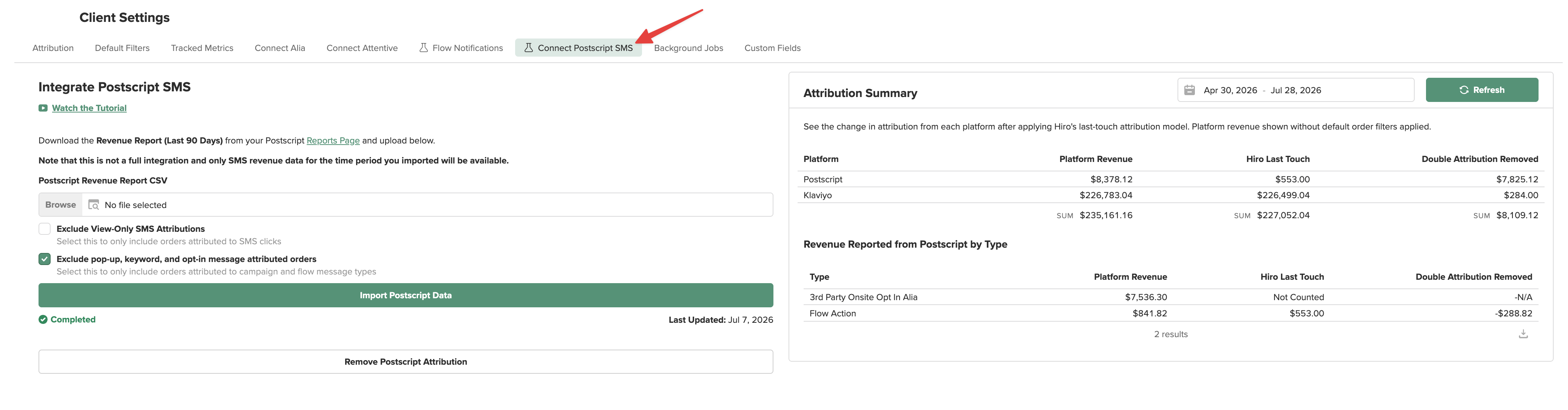
Platform Revenue: Shows Postscript’s raw revenue vs. Klaviyo (or other platforms).
Last-Touch Revenue: Applies Hiro’s last-touch model so credit goes to the final channel before purchase (e.g., SMS vs. email).
Double Attribution Removal: Ensures orders aren’t double-counted across platforms.
Example:
If someone received an SMS, then clicked an email, the revenue goes to email.
If someone received an SMS and ordered right after, the revenue stays with SMS.
Once the import is complete, Postscript SMS revenue will appear through out the platform and can be pulled into any report pages.
Note: Engagement metrics (clicks, recipients) will show as zero since this integration only tracks revenue.
Step 4: Re-upload the CSV Monthly
Your first upload brings in 90 days of history; each new upload adds the next period. Re-upload monthly, before reporting, to keep the SMS data current.