
Segment Analysis
By analyzing campaign performance by segment, you can quickly identify which audiences engage, click, and convert the most. This makes it easier to answer questions like:
Which segments respond best to our campaigns?
Which campaigns perform best for specific audiences?
Are certain segments overperforming or underperforming compared to the average campaign?
How It Works
Segment Analysis uses a campaign performance export from Klaviyo to analyze how each segment performed across campaigns.
To run an analysis:
Navigate to Create Campaign Report in Klaviyo
Remove the default fields
Add the exact fields, in order
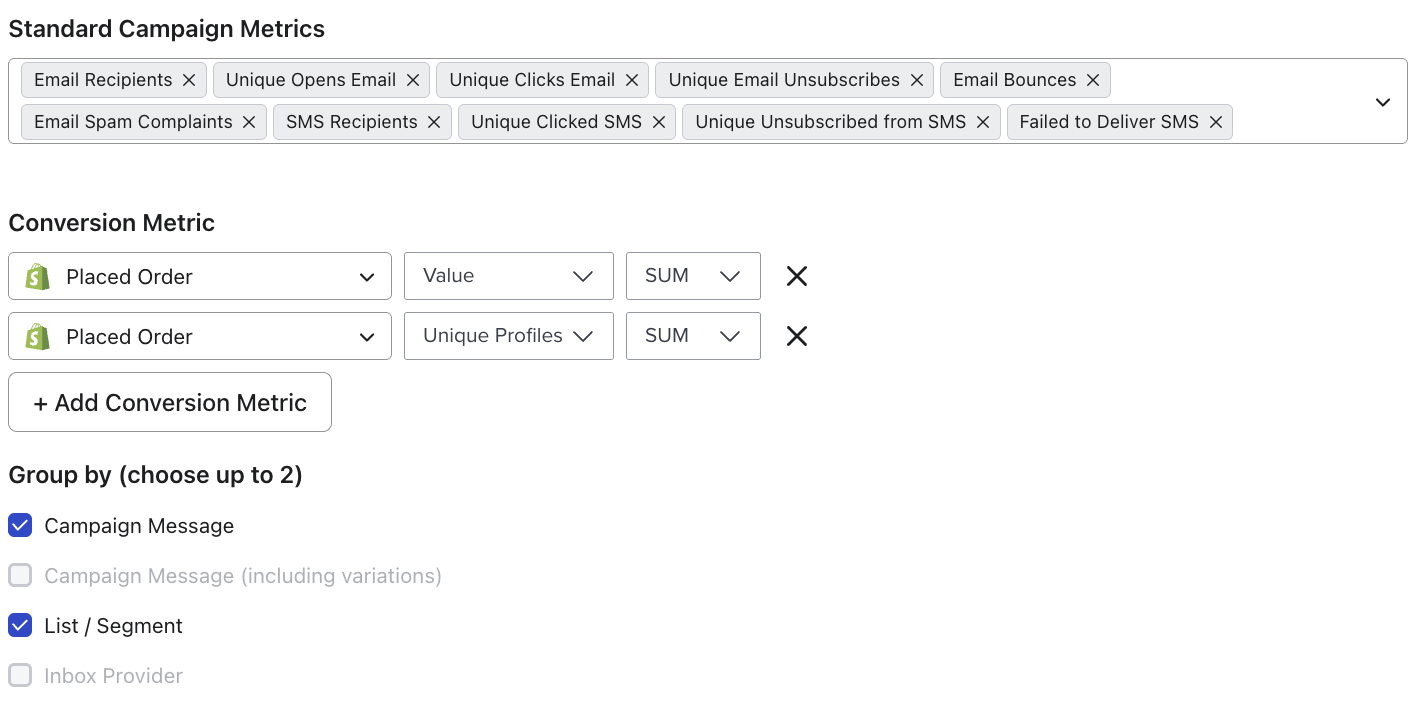
Add the Placed Order Value Sum and Total Sum
Check the Group by Campaign and List / Segment
Choose the timeframe you want to analyze
Save and download report
Once uploaded, the file will remain available for future analysis. You can upload a new CSV anytime to refresh the data with a more recent timeframe.
What You'll See
Segment Current vs Previous Period
This view compares how a segment performed in the current time period versus the previous one.
Segment vs Campaign Average
This view compares how a segment performed relative to the average campaign performance from the selected period. This helps you identify high-performing audiences, segments that may need different messaging, and audiences that consistently outperform the average campaign.
Segment Performance Over Time
This view shows performance trends for a segment across time.
You'll see metrics like Deliveries, Open Rate, Click Rate, and Revenue per Recipient.
Tracking these trends helps you understand how engagement and revenue from a segment changes over time.
Campaigns with Segment Breakdown
This view provides a faster way to see the audience breakdown for each campaign. Instead of manually checking the audience breakdown in Klaviyo, you can quickly see how different segments performed for each campaign.
Best Campaigns by Segment
This view flips the analysis and shows which campaigns performed best for a specific segment. Instead of looking at the total campaign performance, it shows how that individual segment performed within the campaign.
Common Use Cases
Identify high-performing audiences
Understand which segments consistently outperform the average campaign.Optimize targeting
Use insights to send specific campaigns to audiences that engage the most.Analyze campaign effectiveness by segment
See which campaigns perform best for different customer groups.Spot engagement trends
Track how segment engagement changes over time.
Segment Analysis vs Segment Cohorts
While both tools analyze segments, they answer different questions.
Tool | Focus | Key Question |
Segment Analysis | Campaign performance by segment | How well does this segment respond to campaigns? |
Segment Cohort | Customer value over time | How valuable is this segment as customers? |
If you want to understand the long-term value of a segment, use Segment Cohorts.